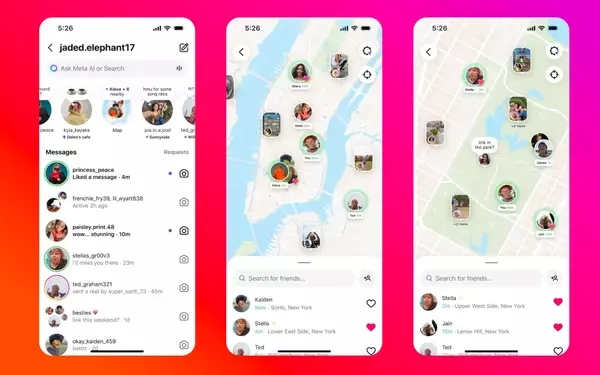
Instagram's recent introduction of its Map feature has stirred considerable discussion among its user base, primarily concerning privacy implications. While the platform asserts that location sharing is an opt-in choice, a wave of social media discourse suggests widespread misunderstanding, with many users incorrectly believing their location is automatically broadcast. This new functionality, similar in concept to Snap Map, allows individuals to view friends' recent whereabouts and discover geographically tagged content. Users must actively grant permission for their location to be visible, undergoing a two-step confirmation process to ensure intentional sharing.
Understanding and managing one's privacy settings is crucial for Instagram users engaging with the new Map feature. The Map is designed to display location data from recent Stories or Reels that have been explicitly tagged with a location, making existing information more accessible. While distinct from Snapchat's continuous real-time tracking, Instagram Map updates only when the app is actively in use or running in the background. Users maintain full control over their location visibility, able to adjust settings at any time to restrict who, if anyone, can see their shared position. The feature also enhances content discovery, allowing users to explore local events and activities through their network's shared posts and ephemeral 'Notes' tied to specific locations.
Understanding Instagram's Location Map
The new Instagram Map, a recent addition to the platform, enables users in the United States to share their current location and explore content that is geographically relevant. While this functionality opens up new avenues for interaction and discovery, it has also sparked significant user concern regarding personal privacy. Instagram’s leadership has been keen to clarify that the feature is not automatically enabled; users must actively consent to share their location. Despite these reassurances, a prevalent misconception exists among the user base that their location data is being shared without their explicit permission, leading to calls for users to deactivate a feature they believe is on by default.
To alleviate these concerns, Instagram's head, Adam Mosseri, has addressed the issue, emphasizing that user location is only made visible through a deliberate, opt-in process requiring dual confirmation. This means that for a user's location to appear on the Map, they must intentionally choose to enable it, and then confirm that decision. The Map displays location tags from recent Stories and Reels, which has inadvertently contributed to the confusion, as some users are observing their own location on the Map and assuming it is universally visible. It is important to note that the Map only updates location when the application is open or running in the background, contrasting with the real-time, continuous tracking options seen in some other social applications. This distinction is vital for users to understand how their data is being used and how to manage their privacy effectively.
Controlling Your Location and Engagement on Instagram Map
Accessing the Instagram Map is straightforward; users can find it within their direct messages (DMs) by tapping the newly added 'Map' option. Upon the initial interaction with the Map, a prompt will appear, clearly stating that no one can view your location until you explicitly grant permission. This prompt also highlights the flexibility users have to modify their sharing preferences at any given moment. This transparent approach aims to empower users to make informed decisions about their privacy on the platform, reinforcing that location sharing is entirely within their control and not a default setting.
Managing your location-sharing preferences on Instagram is an intuitive process. The first time you engage with the Map, you will be presented with choices for sharing your location, including options to share with 'Friends' (followers you reciprocate following), 'Close Friends,' specific users, or to keep it private altogether. To adjust these settings later, navigate to your profile, select the settings option, then choose 'Story, live and location,' and finally, tap 'Location sharing.' Here, you can easily modify your preferences. Even if you opt to keep your location private, you can still view others' shared locations and engage with location-based content such as Stories, Reels, and ephemeral 'Notes' that are geographically tagged. These features allow for discovering local events and content posted by friends and creators, irrespective of your own sharing status.