The iPhone's built-in Magnifier app, often overlooked, is a powerful accessibility tool that offers far more than just enlarging text. This free, pre-installed application simplifies the challenge of reading small print or viewing distant objects, and provides a suite of customizable features to enhance visual assistance.
Discover Your iPhone's Magnifier: A Comprehensive Guide
For those moments when fine print becomes an insurmountable hurdle, or when deciphering distant details is a struggle, the iPhone's Magnifier app emerges as an indispensable companion. This feature, a cornerstone of iOS accessibility since 2016 and a standalone application from iOS 14 onwards, is a seamless solution for visual challenges.
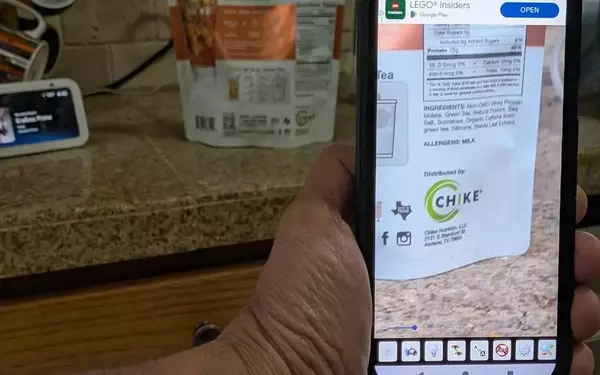
To access this robust tool, simply swipe down on your iPhone screen to reveal the search bar. Typing "Magnifier" will quickly bring up its distinctive icon—a gray magnifying glass set against a black square. Unlike the standard Camera app's zoom function, the Magnifier allows for precise adjustments, enabling users to effortlessly enlarge or reduce the view with a simple slide of the yellow dot. This intuitive control ensures optimal visibility for any text or object.
Beyond its basic magnification capabilities, the app is equipped with advanced features designed to further assist users. The "Reader" option, accessible after capturing an image of text, provides an instant transcript and offers a text-to-speech function, transforming visual information into auditory feedback. For those with more complex needs, the "Detect" feature, hidden by default but easily activated in the app's settings, offers voice-to-text descriptions for both scenes and text. This means your iPhone can describe your surroundings or read aloud any text it identifies, providing an immersive and helpful experience.
Furthermore, the Magnifier app excels in customization through its "Activities" function. Users can create personalized modes for specific scenarios, such as reading menus in a dimly lit restaurant. By naming an activity, selecting an appropriate icon (like a fork and knife), and configuring primary controls like zoom and flashlight, the app adapts to individual preferences, offering a tailored and efficient accessibility solution.
Whether it's adjusting brightness and contrast, applying filters, or locking focus, the Magnifier app’s extensive customization options underscore Apple’s commitment to inclusive technology. It transforms the iPhone into a dynamic visual aid, ensuring that everyone can navigate their world with greater ease and independence.
The iPhone's Magnifier app represents a triumph in accessible technology. Its comprehensive features, from basic magnification to advanced text-to-speech and customizable activity settings, empower users to overcome visual barriers with remarkable ease. This ingenious tool underscores the profound impact thoughtful design can have on daily life, offering a blend of simplicity and sophistication that truly enhances user experience.